Google Ads + Meta Ads· a workspace for every business
Launch Google and Meta campaigns you can actually explain.
AdPilot reads each business’s website and products, builds campaigns the way each platform expects, checks them before launch, and answers your questions from the campaign data it holds. When it proposes a change, nothing happens until you confirm it.
- Every campaign is created paused
- AI changes run only when you confirm
- Each business is its own workspace
- Answers are checked against your data
Unedited recording of the current product. Open the original
Build
Campaigns from the business itself
AdPilot reads the website and products, then builds Google and Meta campaigns step by step — structure, targeting, ads and creative.
- Store read
- Keywords
- Ad groups
- Ad sets
- Ad copy
- Product images
Check and launch
Nothing goes out unchecked
The wording is reviewed against the business's own site, every blocker names the step that fixes it, and the launch lands paused on your ad account.
- Policy review
- Launch readiness
- Preview by placement
- Created paused
Understand
Know what each campaign is doing
Stats from confirmed platform reads, analysis and recommendations — and an Assistant that answers from that data, not from a guess.
- Stats
- Analysis
- Recommendations
- Assistant
How it works
From a website to a reviewed launch — and everything after it.
Nine steps, shown with screens from the product. Pick one to see it, or jump to that moment in the tour.
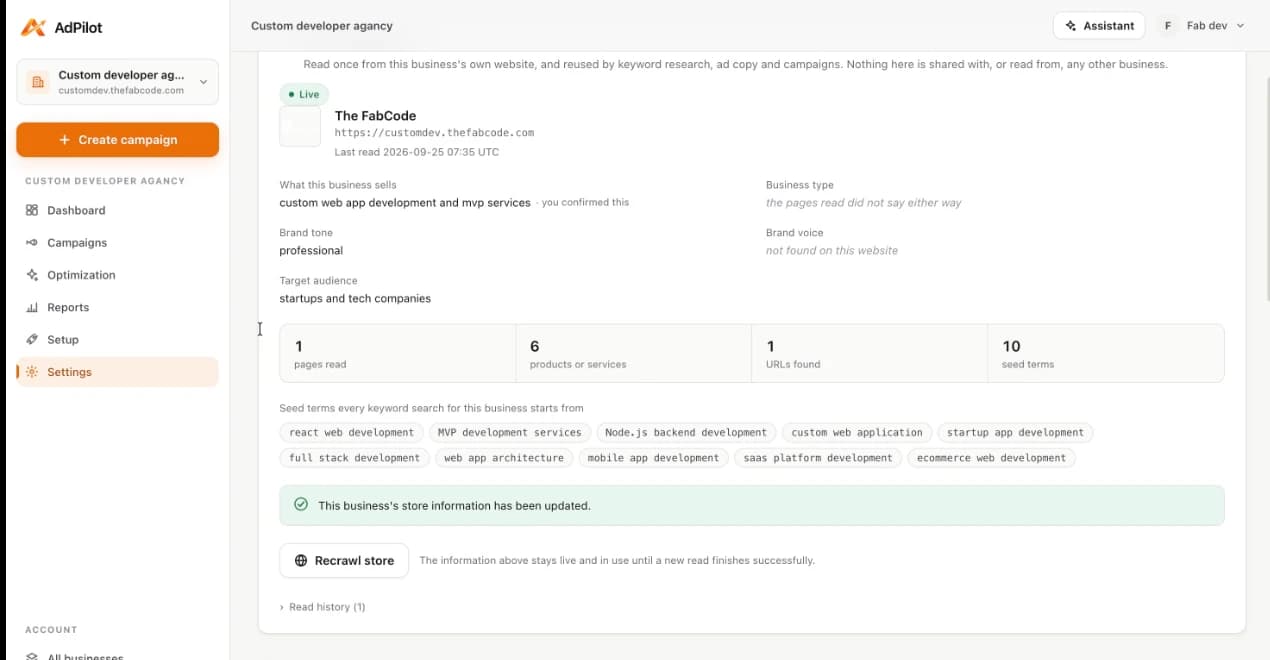
Understand the business
AdPilot reads the business's own website — what it sells, its tone, its audience — and proposes the seed terms keyword research starts from. You confirm what it found. A Shopify store can be connected too; AdPilot reads its products and nothing else.
01
Understand the business
AdPilot reads the business's own website — what it sells, its tone, its audience — and proposes the seed terms keyword research starts from. You confirm what it found. A Shopify store can be connected too; AdPilot reads its products and nothing else.
02
Build the campaign
Start a campaign inside the business's workspace and AdPilot walks it step by step, opening wherever you left off.
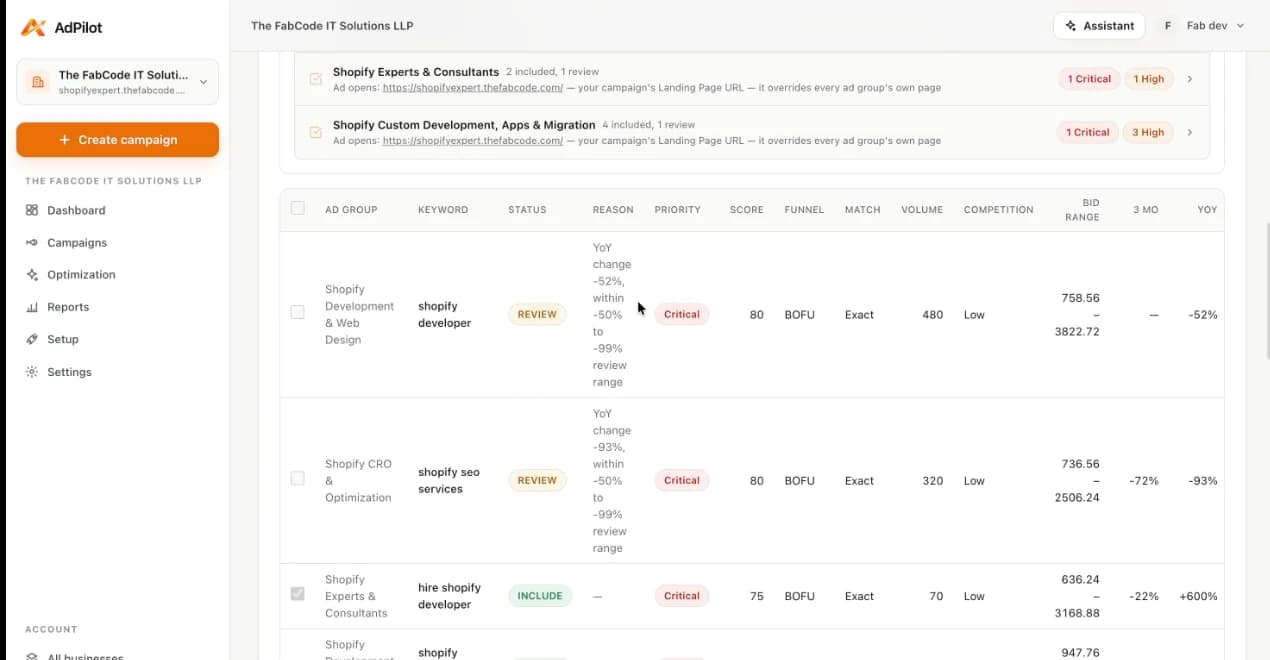
- Google Ads
- Search campaigns from your own keywords or a Keyword Planner CSV — analysed, scored and grouped. Shopping and Performance Max once Merchant Center is linked.
- Meta Ads
- Campaign objective, daily budget and landing page. Website traffic today; Sales and Leads are refused until a Pixel or lead form can be named.
03
Ad groups and ad sets
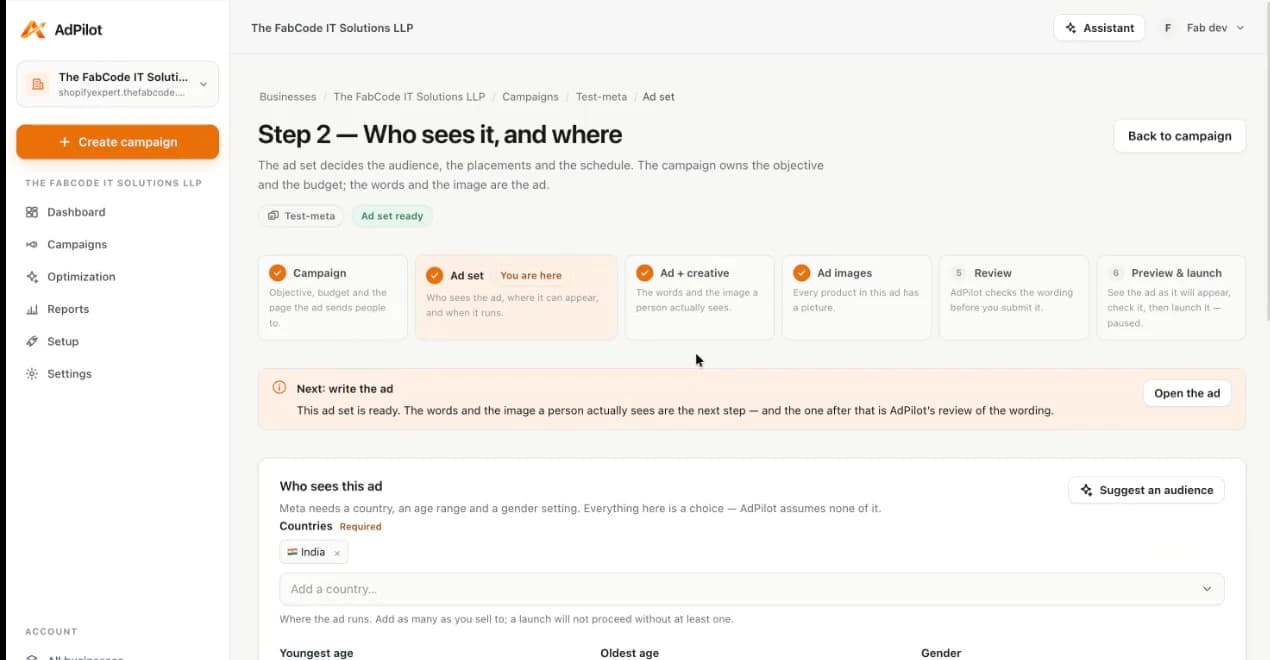
The level below the campaign is where the two platforms differ most, so AdPilot keeps them separate.
- Google Ads
- Ad groups come from the keyword analysis, each with its own keywords and landing page, plus campaign and ad-group negatives.
- Meta Ads
- One ad set: countries, ages, gender, Advantage+ audience, placements and schedule. An AI audience suggestion fills the form; it never saves itself.
04
Ads and creative
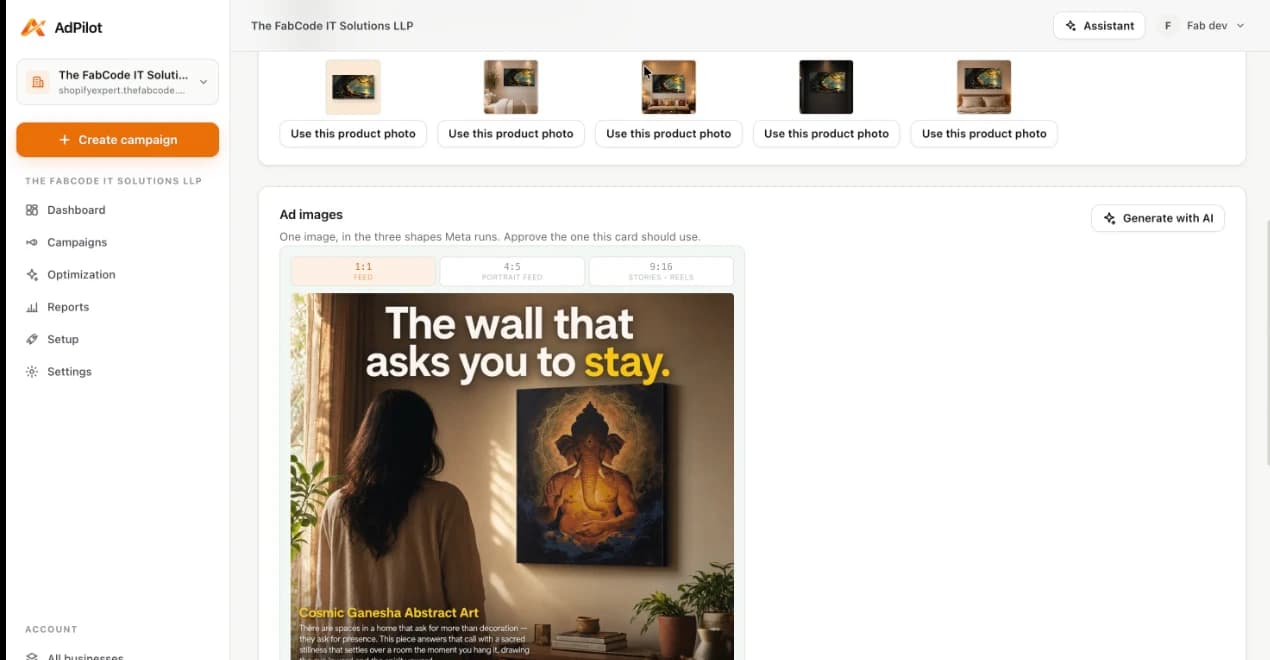
Write it yourself or let AdPilot draft it from what it read about the business — every option is checked against that evidence before it is offered.
- Google Ads
- A responsive search ad per ad group — up to 15 headlines and 4 descriptions within Google's limits — plus sitelinks, callouts and structured snippets.
- Meta Ads
- Single image or carousel. Each card's picture is a Shopify product photo, an upload or a generated image, in the 1:1, 4:5 and 9:16 shapes Meta runs.
05
Review policy and readiness
Before anything is submitted, AdPilot reviews the wording against the business's own site and lists every blocker with the step that fixes it. Warnings are told apart from blockers, and the platform still reviews the ad itself after submission.
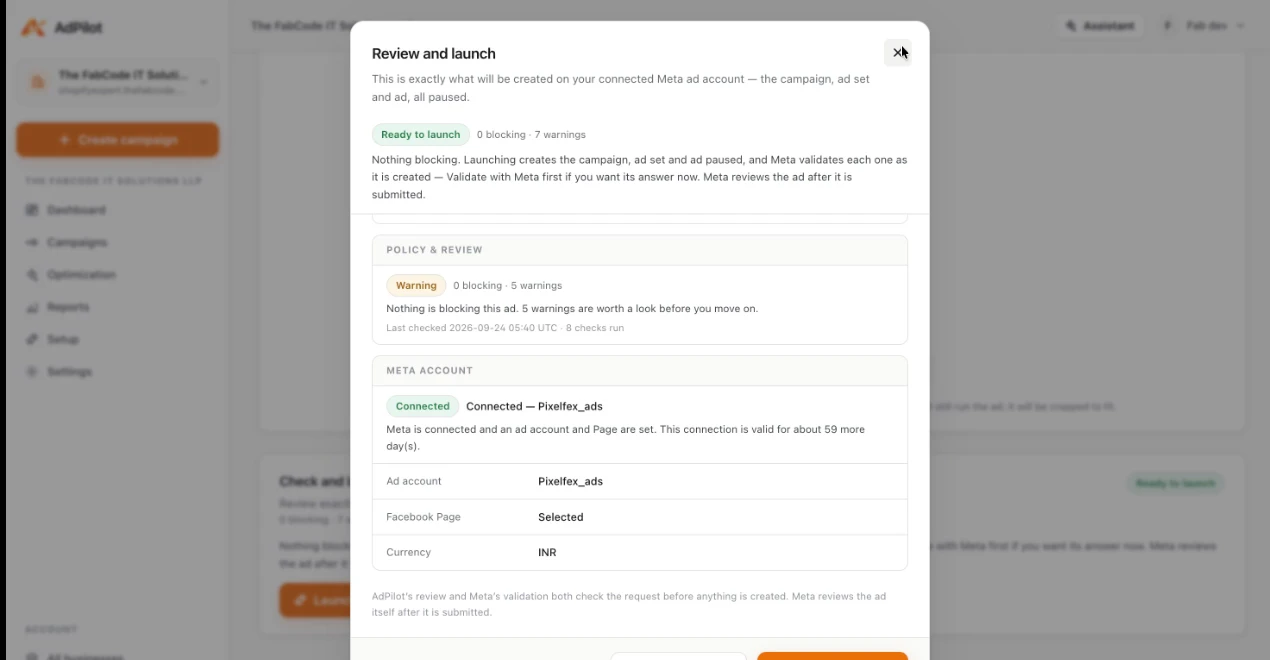
06
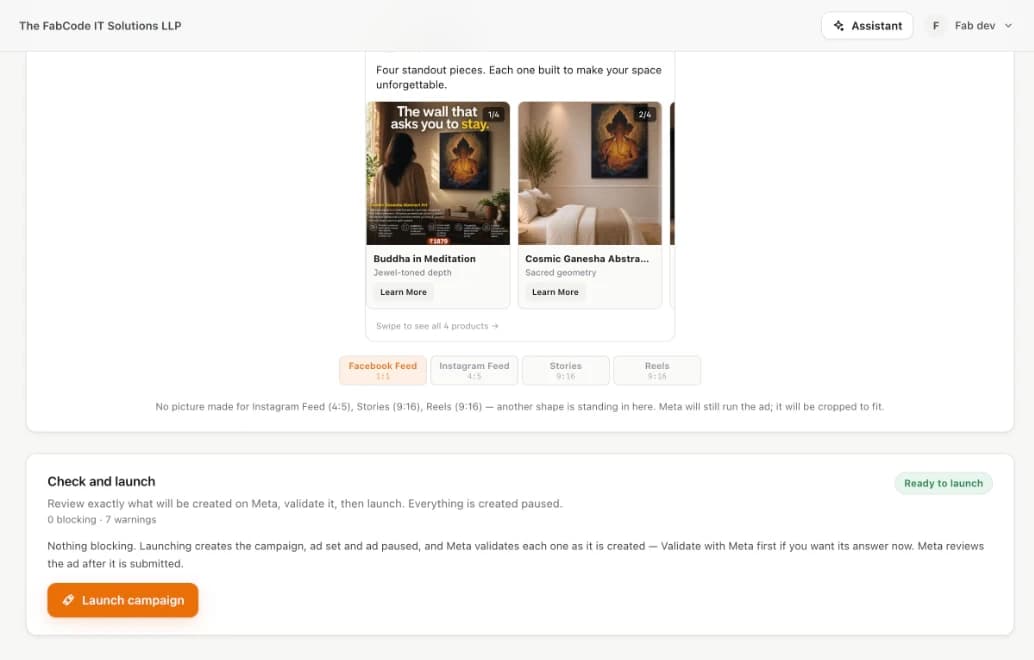
Launch — paused
Preview the ad placement by placement, then launch. The campaign is created on your own ad account, paused, so nothing spends until you turn it on.
07
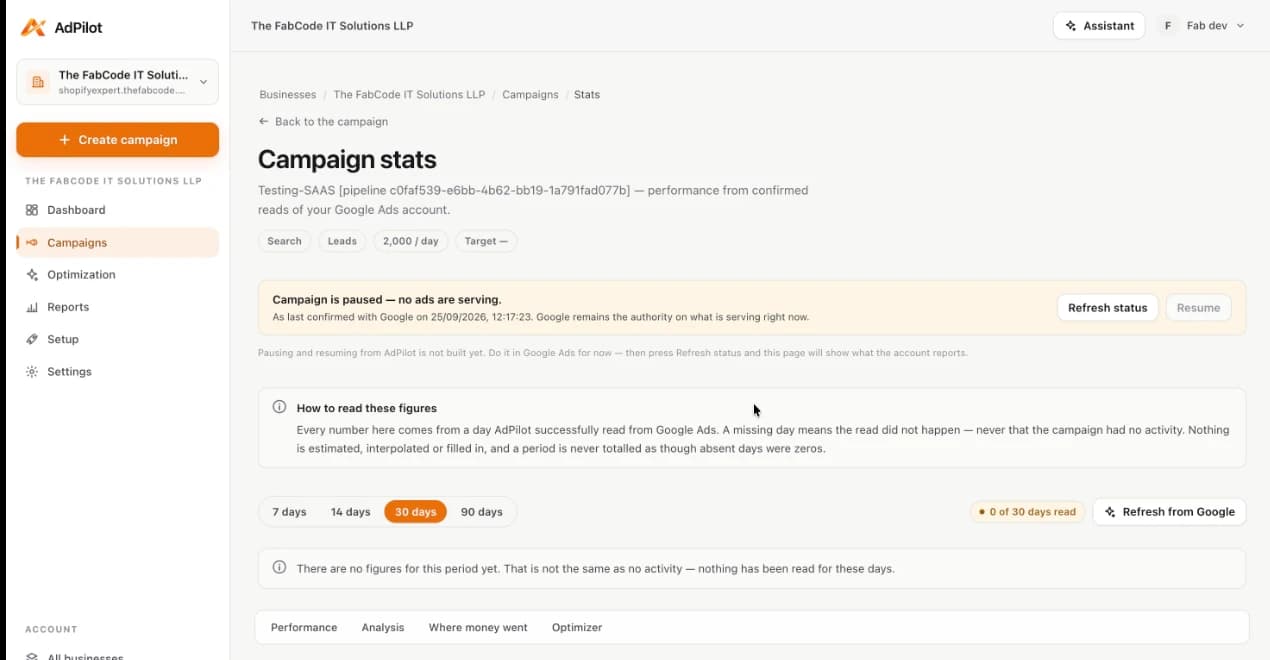
Monitor real performance
Stats come from confirmed reads of the ad platform over 7, 14 or 30 days (and 90 on Google). A day that was not read shows as missing — never as zero, never estimated.
08
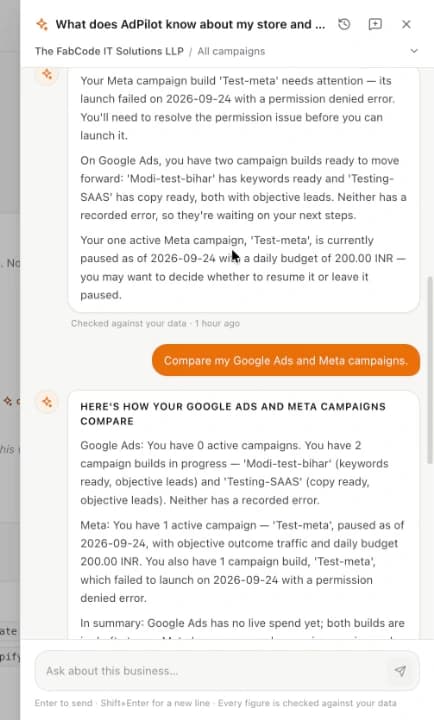
Ask the Assistant
Open the Assistant on any page and ask what is happening. It knows which business, campaign, ad group, ad set or ad you are looking at, answers from that saved data, and checks every figure before you see it.
09
Recommendations, then your decision
Stats analysis turns into recommendations with the evidence beside them. Supported changes run only when you confirm: pausing or resuming a Meta campaign, changing its daily budget, or applying a budget recommendation.
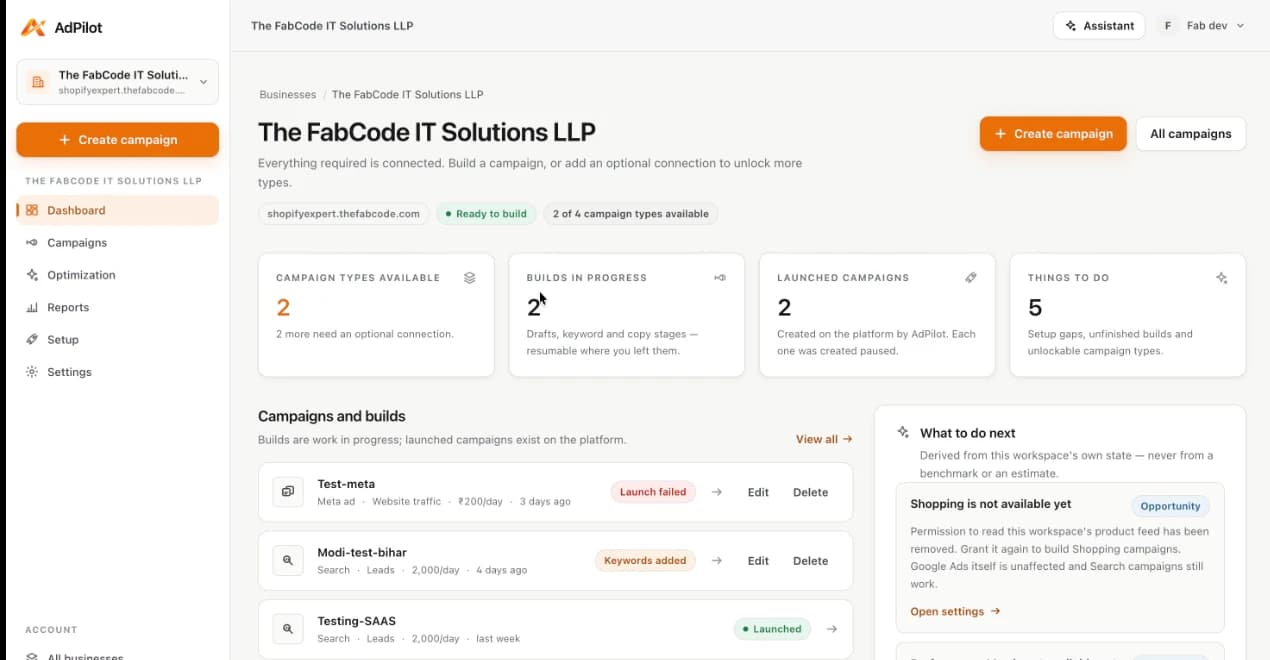
The Assistant
Ask about your campaigns. Get answers from your campaigns.
It is not a general chatbot. It answers from the data AdPilot holds for this business — store, campaigns, keywords, ad groups, ad sets, ads, stats and recommendations — and on a Google campaign it can read keyword, ad group and ad figures from Google Ads for the question you asked.
- Which keywords are getting the most clicks?
- Which ads are getting the most impressions?
- Which campaigns need attention?
- How is this campaign performing?
- What should I improve?
- It knows where you are
- The business, and the campaign, ad group, ad set or ad on the page you opened it from. Ask about one campaign and it reads that campaign.
- Every figure is checked
- A number in an answer has to be in the data it read. If it is not, you get no answer — and a sentence saying why — rather than a confident guess.
- Google and Meta stay apart
- A question on a Meta campaign is answered from Meta data. Google figures appear only when you ask for both, for example to compare them.
- It proposes; you decide
- On a Meta campaign it can propose a pause, a resume, a new daily budget or a budget recommendation. Nothing is sent until you press Confirm, and a proposal expires after ten minutes.
Google Ads + Meta Ads
One workspace. Two platforms, each on its own terms.
A workspace is one business: its website, its own Google Ads and Meta accounts, its Shopify store and its campaigns. Nothing is shared with the other businesses on your login — and the two platforms are never forced into one shape.
Workspace — one business
Website · Google Ads · Meta · Shopify · campaigns
Google Ads campaigns
Campaign → ad group → ad- Campaigns
- Search. Shopping and Performance Max once a Merchant Center account is linked.
- Targeting
- Keywords and match types, campaign and ad-group negatives, target market and languages.
- Creative
- A responsive search ad per ad group: up to 15 headlines and 4 descriptions, plus sitelinks, callouts and snippets.
- Before launch
- Ad copy policy review, then Google validates the exact request before anything is created.
- Reporting
- Campaign stats, plus keyword, ad group and ad figures read from Google Ads.
- Changes
- Status refreshed from Google on request. Pausing is done in Google Ads for now.
Meta Ads campaigns
Campaign → ad set → ad- Campaigns
- Website traffic. Sales and Leads are refused until a Pixel or lead form can be set.
- Targeting
- Countries, ages, gender, Advantage+ audience, placements and schedule on the ad set.
- Creative
- Single image or carousel, with pictures in the 1:1, 4:5 and 9:16 shapes Meta runs.
- Before launch
- AdPilot reviews the wording; Meta validates each object as it is created, then reviews the ad.
- Reporting
- Campaign, ad set and ad Insights — including reach, frequency and CPM.
- Changes
- Pause, resume and daily budget from AdPilot — each one confirmed by you.
Campaign intelligence
Don't just launch campaigns. Understand them.
Stats, analysis and recommendations for every launched campaign, at the levels each platform reports — and every figure comes from a confirmed read of the ad platform. A day that was not read stays empty; it is never shown as zero or estimated.
The Stats page for a Google campaign, from the tour. This campaign had no delivery yet, and the page says so rather than showing zeros.
Metrics
- Spend
- Impressions
- Clicks
- CTR
- CPC
- Conversions
- CPA
- ROAS
- ReachMeta
- FrequencyMeta
- CPMMeta
Levels
- Campaign
- KeywordGoogle
- Ad groupGoogle
- Ad setMeta
- Ad
Trends
Daily figures over 7, 14 or 30 days — and 90 on Google — so a change shows up as a change, not as a single total.
Analysis
What is working, what needs attention, and which checks could not be judged yet — with the threshold each one needed.
Recommendations
Budget changes with the evidence beside them. On Meta a budget recommendation can be applied from AdPilot, only after you confirm it.
Products and creative
From your products to an ad that is ready to run.
Connect a Shopify store and AdPilot reads its products — never orders or customers. Those products, and what AdPilot read on the business's website, ground the ads it helps you write.
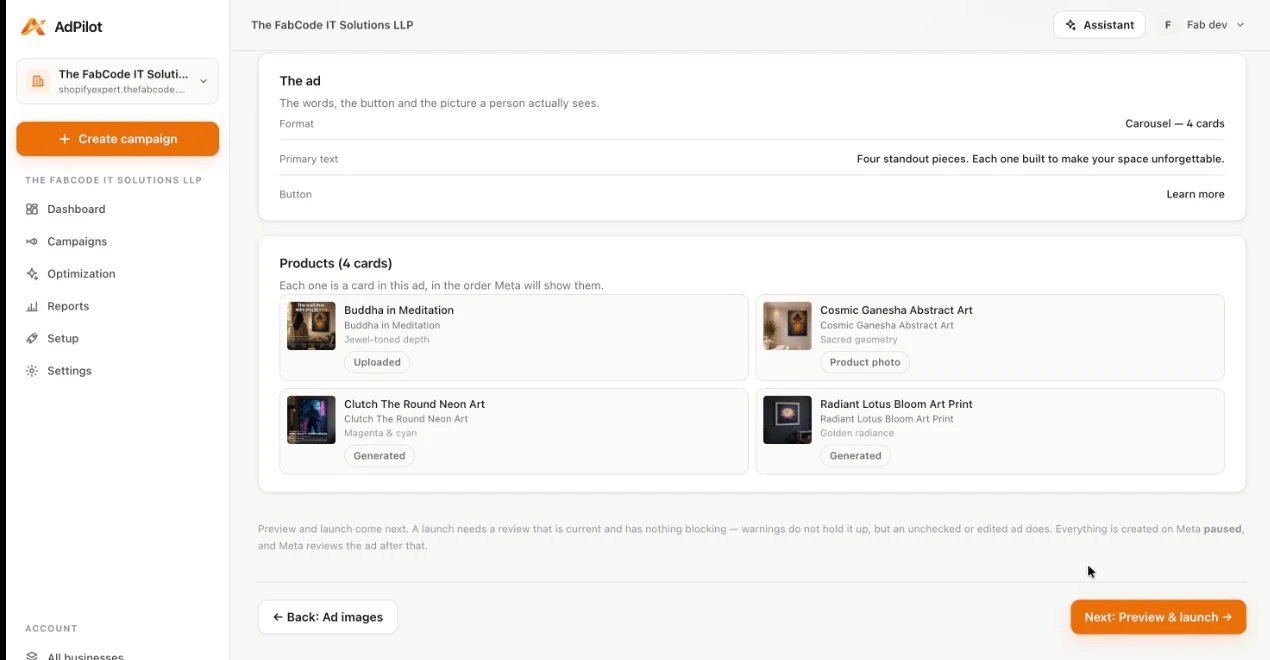
01
Choose the products
Pick products from the connected store. In a carousel each one becomes a card with its own headline, description and link.
02
Give each card its picture
Use the product's own photo, upload one, or generate one. Only an approved, stored image is ever sent to Meta.
03
Review it, then preview it
See the ad in each placement, the wording review and anything blocking — before the launch button is ever live.
Controls
Built for real ad accounts and real budgets.
AdPilot works on your own Google Ads and Meta accounts, so it is built to be predictable: it states what it knows, refuses what it cannot check, and waits for you.
Each business is sealed off
Its own website, connected accounts, credentials, campaigns and Assistant history. Nothing crosses to another business on your login.
One workspace = one business
Created paused
A launch creates the campaign on your own ad account, paused. It spends only when you turn it on.
Status: paused
You confirm every change
The Assistant proposes; supported changes run only after you press Confirm, and the result is checked with the platform.
Confirm · Cancel
Answers from real data
Assistant answers are built from the business's saved data and live reads, and every figure is checked before it is shown.
Checked against your data
Checks before launch
Blockers are separated from warnings, each names the step that fixes it, and launch stays off until nothing blocks.
0 blocking · 7 warnings
Status stated honestly
A status is labelled with when the platform last confirmed it, and a day that was not read is never shown as zero.
As last confirmed
What it does not do: pause or change anything on its own, optimise in the background, or promise a result. Performance is the platforms’ to report — AdPilot shows you what they reported.
Add a business. See what it can run.
Start with a website and a Google Ads connection. AdPilot shows which campaign types that business can build, and what is still missing for the rest.